RSS reader. Download manager.
On your PC, on your NAS, anywhere.
fastRSS is the lightning-fast RSS reader with a built-in download manager for one-click hosters - as an app for Windows, Linux and Raspberry Pi, and as a server for your NAS or any computer with Docker. It finds the file links in every article, groups multi-part archives, downloads them with your premium account and extracts them automatically.
The lean JDownloader alternative: more about the download manager →





See it in action
Feeds on the left, articles and preview in the middle, the collected links on the right - grouped and ready to copy.
Click to enlarge - light and dark design.


Everything a fast RSS reader needs
Four columns, zero distraction: feeds · articles · preview · links.
Feeds behind a captcha
Solve the captcha once in the built-in browser - fastRSS then reads the feed like any other.
Link collector
Detects file links in the feed and on the web page - including ones loaded later. You choose which hosts to collect.
Parts grouped automatically
.part1.rar, .001, .r00 … end up in one group - sorted, each with its own copy button.
Size up front
The total size of each group is determined in the background. Offline files are marked red right away.
Edge built in
Preview with tabs, captchas and logins right inside the app. Pop-up blocker included, extensions such as uBlock Origin Lite can be installed.
Gallery with zoom
Preview images open as a full-screen gallery: browse, zoom, pan - thumbnails are replaced by the original automatically.
Never miss a thing
Checks automatically at the interval you set and pages back until known articles appear - even on websites without a feed.
Folders and smart views
Sort feeds into folders by drag and drop. Unread, Starred and Today show the articles of all feeds in one list.
Watches
Keyword folders collect matching articles from all feeds - together with their file links.
Move in with OPML
Import the feed list of your old reader, export yours at any time. Enter a website address and fastRSS finds its feed.
Content filters
Hide articles with certain keywords - for all feeds or just one. Filtered articles are not stored and never count as unread.
More on one screen
The compact view shows many more feeds and articles at once. Unread articles stand out with a blue dot and bold type, read ones turn grey.
Share
Send an article by email or copy title, address and all collected file links in one go.
Settings that make sense
One tidy window: how often to check, how long to keep articles per feed, notification-area icon, alerts for new articles.
Stays fast
Catch up marks older articles as read in one go. Clean up deletes old articles, finds silent and broken feeds and shrinks the database.
Made for the keyboard
J and K move through articles, Space jumps to the next unread one, F stars, R toggles read. F1 shows all shortcuts.
Light and dark
Follows your Windows setting or switches with one click - including the article preview.
Ready for AI assistants
Built-in MCP server: Claude and other assistants can read your feeds, collect links and mark articles as read.
Updates with one click
fastRSS checks for new versions, downloads them, verifies the checksum and restarts - your data stays untouched.
Download manager
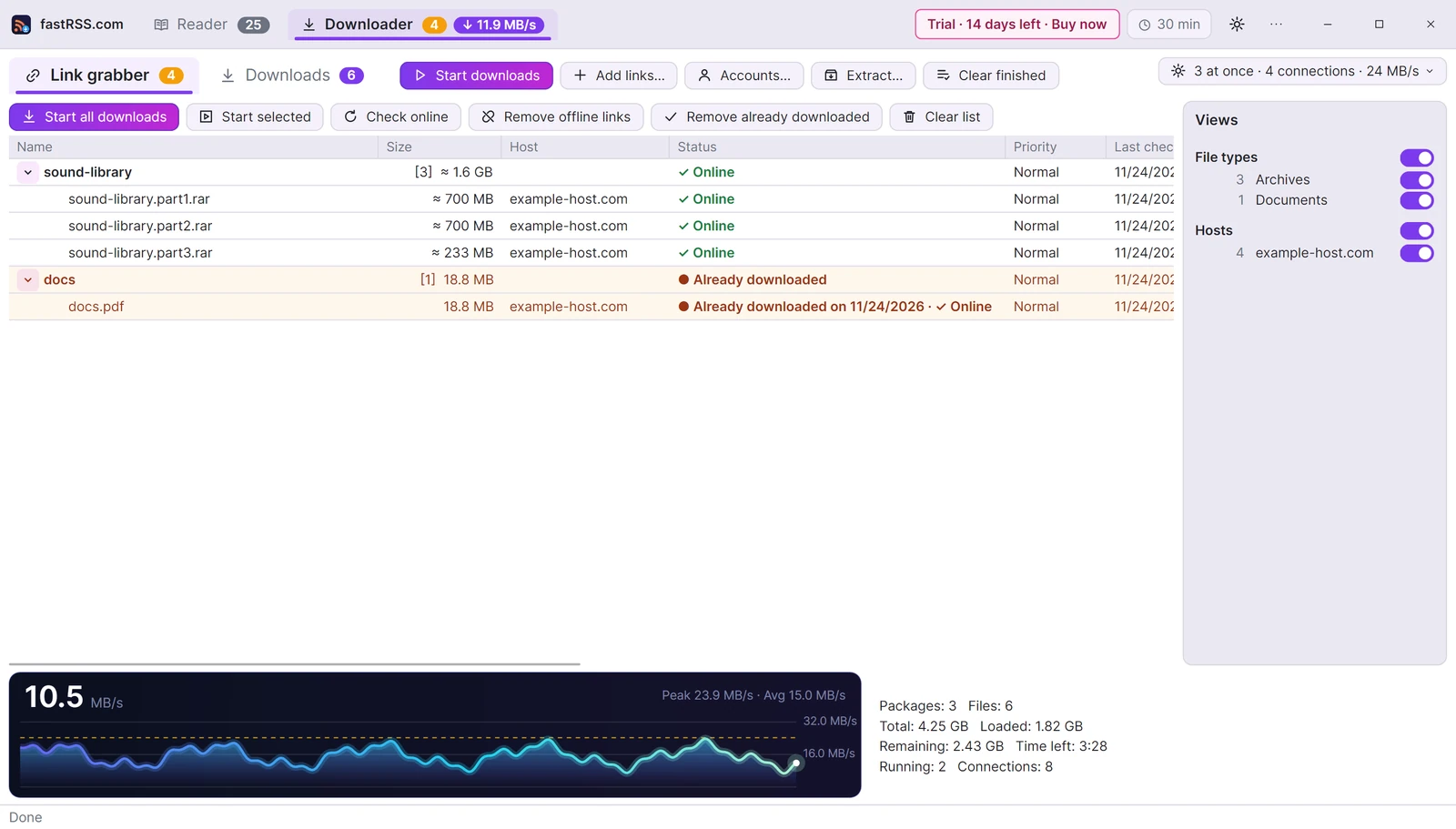
Links from your feeds go straight to the built-in downloader: premium accounts, resume, several connections, automatic extracting.
Sync via your own cloud
Feeds, read status and stars stay in step on all your PCs - through a folder of your cloud storage or WebDAV. No fastRSS account, no server of ours.
Quietly in the background
fastRSS can sit next to the clock. Copy a download link anywhere and a small note shows at once whether the file is online.
Download manager built in
From the feed straight to the finished file - the lean JDownloader alternative for one-click hosters.
Link grabber, premium accounts for rapidgator.net, ddownload.com, fastfile.cc and filejoker.net, resume, several connections per file and automatic extracting of RAR, 7z and ZIP.
Reads feeds behind a captcha
Many sites protect their feed with Cloudflare or a captcha, and ordinary readers then only show an error. fastRSS has a real browser built in.
Solve it once, right in the app
If a feed is blocked, fastRSS opens the page in its built-in browser. You solve the captcha there - nothing is solved or bypassed automatically.
Then fastRSS keeps reading
The feed is fetched with the session of the built-in browser. Your solved captcha therefore counts for the following checks too - until the site asks again.
Lists that load later, too
Websites without a feed whose list is only built by scripts are rendered in the browser and read like a feed.
Sync via your own cloud
Feeds, folders, read status and stars stay in step on all your computers - without a fastRSS account and without a server of ours.
A folder in your cloud
Pick a folder that Dropbox, OneDrive, Google Drive or your NAS keeps in step anyway. fastRSS puts its sync files there - nothing else to set up.
Or directly via WebDAV
Nextcloud, your own NAS or any other WebDAV storage: enter address, user name and password and test the connection with one click.
Nothing on our servers
Your feed list and what you have read stay in your own storage. Watches, content filters and your file hosts travel along; every computer fetches its articles itself.
Up and running in 60 seconds
Download
A single fastRSS_portable.exe - no installation, no admin rights.
Add a feed
Paste an RSS/Atom URL or simply the address of a website list. fastRSS detects the format itself.
Copy links
Click an article and the links appear grouped on the right. One click - on your clipboard.
fastRSS for your AI assistant
fastRSS speaks MCP, the Model Context Protocol. Connect it once and let your assistant work with your feeds.
What the assistant can do
- List feeds and articles, search by title
- Read articles and get the links grouped by parts
- Mark articles as read, star them
- Add feeds and fetch new articles
Everything runs locally on your computer; nothing is sent to us.
Set up in one line
Claude Code:
claude mcp add fastrss -- "C:\fastRSS\fastRSS_portable.exe" --mcp
Claude Desktop and other clients - MCP configuration:
{ "mcpServers": { "fastrss": {
    "command": "C:\\fastRSS\\fastRSS_portable.exe",
    "args": ["--mcp"] } } }
In the app, the 🧩 menu shows both with your actual path, ready to copy.
One price. No subscription.
What you get
- Perpetual license for up to 2 devices
- All updates of version 1.x included
- Activated in seconds - the license key arrives by email
- Switching devices? Just deactivate in the app
- Secure payment via Stripe, cards with 3-D Secure
Try first: the trial is fully functional for 14 days.
incl. statutory VAT
Frequently asked questions about fastRSS
Does fastRSS run without installation?
Yes. fastRSS is a single file: fastRSS_portable.exe on Windows, fastRSS on Linux. It stores feeds and settings in a “data” folder right next to it - perfect for a USB stick. To move it, simply copy both.
What are the system requirements?
Windows 10 or 11 (64-bit) with the Microsoft Edge WebView2 runtime, which is already present on current Windows versions. Or Linux (x64 or ARM64, for example a Raspberry Pi) with WebKitGTK 4.1.
How much does fastRSS cost?
fastRSS costs a one-time €15 - no subscription. The trial is fully functional for 14 days.
How quickly do I get my license key?
With a card payment, immediately on the confirmation page and by email. With other payment methods, as soon as we have received the payment.
On how many devices can I use fastRSS?
On up to 2 devices at the same time. You can release a device in fastRSS under “License → Deactivate”.
Which feeds does fastRSS support?
RSS 2.0, RSS 1.0 (RDF) and Atom. If a website has no feed, fastRSS can read its article list directly and pages back through several pages automatically.
Can I bring my feeds from another reader?
Yes. fastRSS imports and exports feed lists as OPML, the exchange format of all common feed readers - folders included. You can also just enter the address of a website; fastRSS finds its feed.
How do I keep many feeds organised?
Sort feeds into folders, use the smart views Unread, Starred and Today, and create watches: keyword folders that collect matching articles from all feeds. Content filters hide what you never want to see.
Does the database keep growing?
Only if you want it to. You can limit the number or age of articles - for all feeds or per feed - and “Clean up” deletes old articles, lists silent and broken feeds and shrinks the database. Starred articles are always kept.
Which file hosts does the link collector recognise?
You decide: you enter the domains whose links should be collected. fastRSS groups multi-part archives automatically and copies each group with one click.
Can fastRSS read feeds that are protected by a captcha or Cloudflare?
Yes. fastRSS opens the page in its built-in browser, you solve the captcha there, and the feed is then fetched with that browser session. fastRSS never solves or bypasses captchas automatically.
Can I use fastRSS on several PCs with the same feeds?
Yes. fastRSS syncs feeds, folders, read status and stars through a folder in your own cloud storage (Dropbox, OneDrive, Google Drive …) or through WebDAV. Nothing is stored on our servers.
Can an AI assistant use fastRSS?
Yes. fastRSS includes an MCP server (Model Context Protocol). Assistants such as Claude can list feeds and articles, read articles, collect the file links, mark articles as read and add feeds - locally on your computer.
Is my data uploaded anywhere?
No. Feeds, articles and settings stay on your computer. Activation only transmits the license key, an anonymous device ID and the device name; during the trial the app only reports the anonymous device ID so that the trial period can be counted.
I lost my license key - what now?
No problem: at fastrss.com/license we will send it to your email address again.
Found a bug or missing a feature? Send us feedback
Ready for faster feeds?
14 days free · then a one-time €15
Download fastRSS v1.9.3
Windows 10 or 11 (64-bit): start fastRSS_portable.exe. Linux: unpack the archive and start “fastRSS” - it needs WebKitGTK 4.1 (package libwebkit2gtk-4.1-0).